GymVise works with eSSL and ZKTeco attendance devices that support ADMS push. The device sends each punch over the internet to GymVise, which links the device user ID to the member and records attendance in the same log as QR and front-desk check-ins. Fingerprints and faces stay on the device. GymVise does not control doors or gates.
Which devices work with GymVise?
Most eSSL and ZKTeco attendance terminals sold in India support a cloud protocol called ADMS push (also called iclock or “push SDK”). If your device has a Cloud server or ADMS setting in its communication menu, it can send punches to GymVise. Fingerprint, face and card models all send the same kind of punch, because the matching happens on the device.
Devices that only work with a local PC program and have no ADMS option cannot connect directly. Check the menu or ask your supplier before buying a new one.
How does setup work?
- Add the device in Gym Settings using its serial number.
- Point the device at GymVise by entering the server address from the setup guide in the device’s cloud settings.
- Approve it. Once the device has connected, you approve it in the dashboard. Approval ties the device to the internet connection it connected from, so a copied serial number elsewhere cannot post punches to your gym.
- Test it. Send a test from the dashboard, which asks the device to report its details, then punch once to confirm it arrives.
- Link members. Each enrolled person has a device user ID (PIN). Link each PIN to the member in GymVise.
What happens when a member punches in?
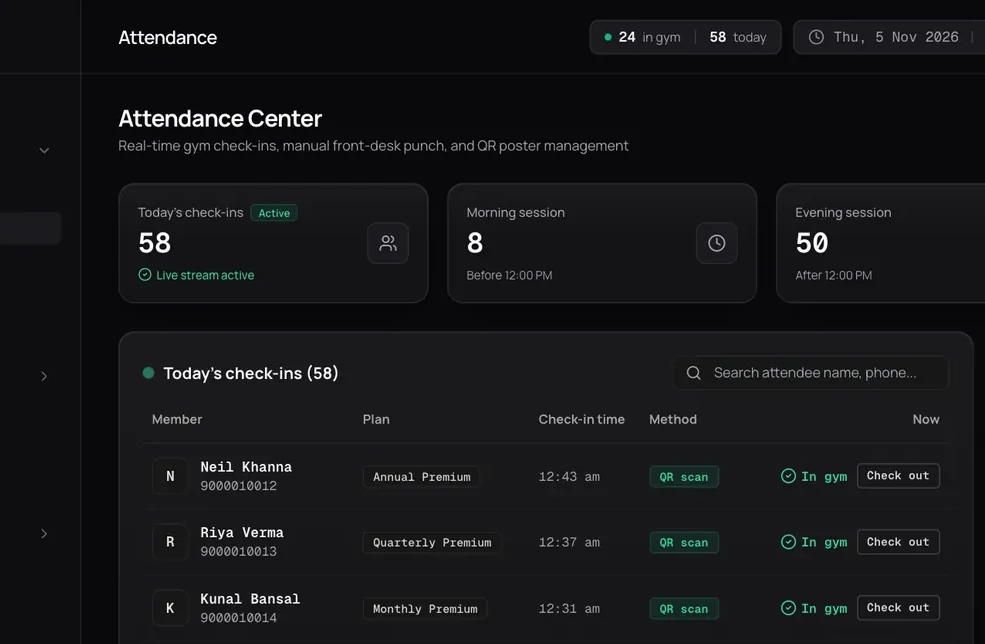
The device sends the PIN and the punch time. GymVise reads the time as Indian Standard Time, ignores punches the device re-sends, and records the visit against the linked member. Punches from PINs you have not linked yet are kept and listed in the dashboard. Once you link the PIN, those punches are applied, so nothing is lost while you finish setup.
You choose how punches count: follow the in or out state the device sends, toggle between in and out, or treat every punch as in or out only. That suits both single-door gyms and gyms with separate entry and exit readers.
Why put biometric and app check-in in one system?
Many NCR gyms already own an eSSL or ZKTeco device but keep its data in a separate PC program nobody opens. When punches land in the same place as plans, renewals and the member app, they become useful:
- The owner dashboard shows who is in the gym now and morning and evening footfall.
- Members who stop punching in are flagged after 10 days, before their renewal date.
- Members who forget a finger or face scan can still check in by QR or at the desk, in the same log.
Read biometric vs app check-in to decide which method should be the default for your gym.
What about fingerprint data and the DPDP Rules?
GymVise receives only the device user ID and the punch time. It never receives fingerprint or face templates, which stay on the device. Your gym still collects biometric data at the device, so get clear consent at enrolment, offer QR as an alternative, and delete enrolments when members leave. See what the DPDP Act means for gyms.
What does the integration not do?
- It does not open doors, turnstiles or gates.
- It has no face recognition of its own. Face matching happens on face-capable devices.
- It does not enrol fingerprints. Members are enrolled on the device as usual.
- It works with ADMS-capable eSSL and ZKTeco devices. Other brands are not supported yet.
See it with your own gym’s data
Book a demo and we will set it up with your plans, members and timetable.
Book a free demoFrequently asked questions
Yes, with eSSL and ZKTeco devices that support ADMS push. The device sends punches over the internet and GymVise records them as attendance for the linked member.
No. GymVise receives only the device user ID and punch time. Fingerprint and face templates stay on the device.
No. GymVise records attendance only. Door, turnstile and gate control stay with the device or your access-control system.
They are kept and listed in the dashboard. When you link the device user ID to a member, those earlier punches are applied to their attendance.