GymVise replaces registers with QR check-in: the gym displays its GymVise QR code, staff can mark attendance from the dashboard, and eSSL or ZKTeco biometric devices can be connected if you already have them. Every visit is saved to the member's profile, today's attendance is visible at a glance, and members who stop coming are flagged automatically.
Why attendance data matters
Attendance is the earliest warning sign that a member is about to quit. Members rarely cancel in one day: they come four times a week, then twice, then not at all, and the renewal quietly lapses. A register or a standalone biometric machine records those visits, but nobody looks at the pattern until it is too late. Read our comparison of biometric vs app check-in.
How QR attendance works in GymVise
- Print your QR poster. The dashboard generates your gym's attendance QR code as a printable poster for the desk or entrance.
- Members scan to check in. They open the GymVise app on their phone and scan the poster. The visit is saved to their profile instantly.
- Front desk can punch anyone in. For members without a phone, staff search by name or mobile number and confirm a manual check-in.
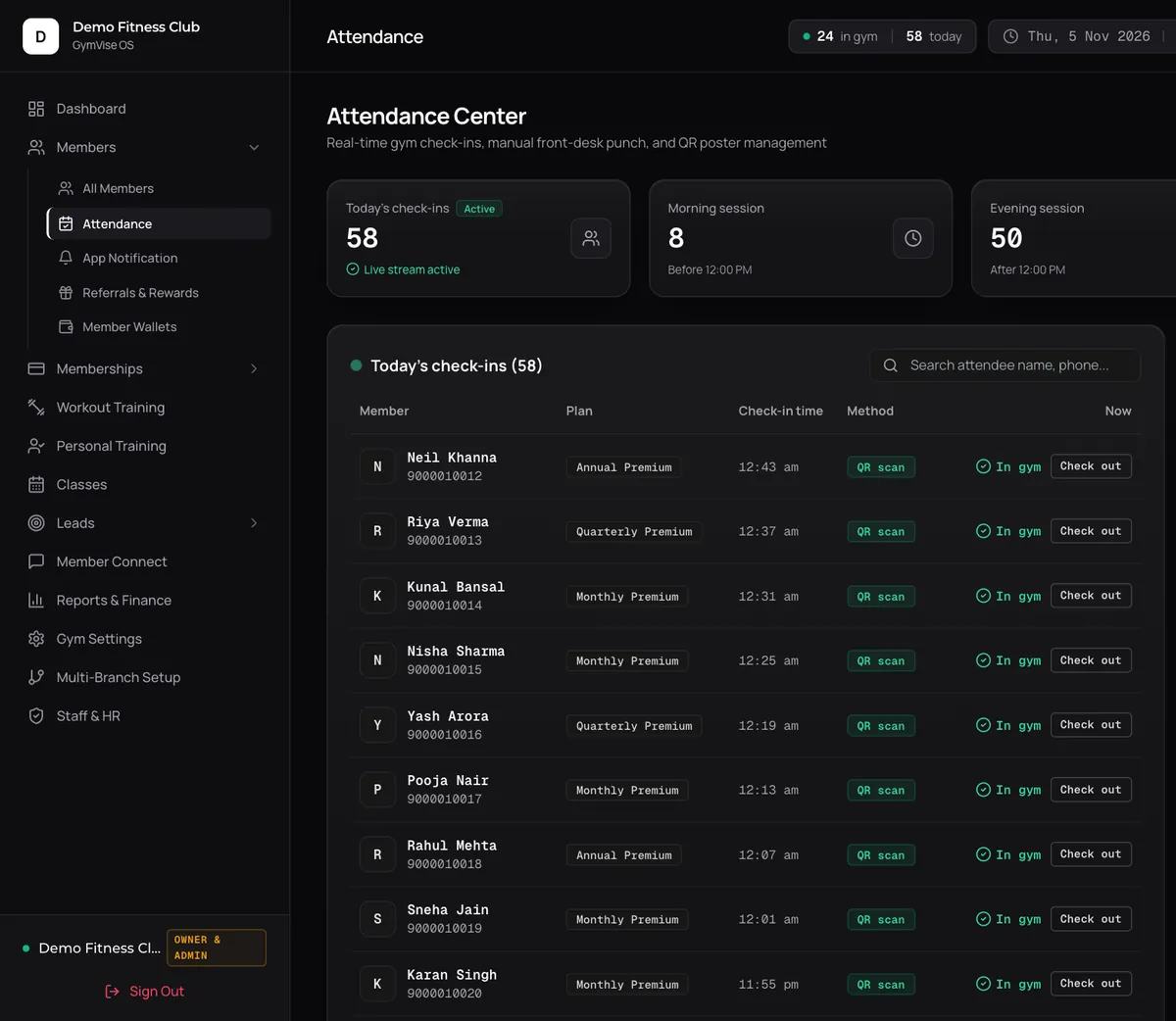
- Everything lands in one place. Today's check-ins, each member's visit history and the method used (QR self-scan, front desk or biometric device) all appear in the Attendance Center.
Already have a biometric device?
You don't have to replace it. GymVise can take attendance from eSSL and ZKTeco devices that support ADMS push:
- Add the device. Enter its serial number in the dashboard and choose how it records direction: the device's own in and out keys, alternating in and out, entry only or exit only.
- Point it at GymVise. Enter the server address shown in the dashboard in the device's cloud server settings.
- Link device users to members. Punches from users you haven't linked yet wait in a list, and are applied to the member's attendance once you link them.
GymVise receives the device user ID and punch time, not the fingerprint. The device records attendance only: GymVise does not open doors or stop expired members at a gate.
What the Attendance Center shows
- Today's check-ins with time and method for every visit
- Morning and evening sessions, with your peak slot and highest footfall, so you can plan trainer shifts and floor staff
- Visit history on every member profile
- CSV export of attendance for your own records
- Inactivity alerts on the owner dashboard for members with no visit or workout in 10 or more days
QR check-in vs biometric machines vs registers
| GymVise QR | Biometric machine | Register | |
|---|---|---|---|
| Hardware cost | None (a printed poster) | Device, installation and repairs | None |
| Hygiene | Contactless | Shared fingerprint reader | Shared pen and book |
| Biometric data to protect | None | Fingerprints or face data | None |
| Linked to member profile | Yes, automatically | Often a separate system | No |
| Spots members going quiet | Yes, 10-day inactivity alerts | Rarely | Only if someone reads it |
| Controls a door or turnstile | No | Yes, with access-control models | No |
If you need a locked door or turnstile that only opens for paid-up members, a biometric access system does that and GymVise does not. For most independent gyms with a staffed front desk, QR check-in gives better data at no hardware cost.
Turning attendance into retention
Every check-in feeds the owner dashboard. When a regular stops coming for 10 days, they are flagged so the desk or their trainer can call before the renewal date. Combine that with automatic renewal reminders and fewer members slip away unnoticed. Our churn playbook shows the full routine.
Set it up in 15 minutes
- Add or import your members (CSV import works from Excel or Google Sheets).
- Print the QR poster from the Attendance Center and put it where members walk in.
- Ask members to download the free app and join your gym with its code.
- Show the front desk how to punch in members who forget their phone.
Already own a fingerprint or face device? Read how GymVise works with eSSL and ZKTeco biometric attendance.
Frequently asked questions
The gym prints its GymVise QR poster from the dashboard. Members scan it with the GymVise app to check in, and front-desk staff can manually check in anyone without a phone. Each visit is saved to the member's profile.
No. GymVise works without any hardware, and it can also take attendance from eSSL and ZKTeco devices if you already have one. Note that GymVise does not control doors or turnstiles; if you need gated access, you would still need an access-control system.
Yes. The Attendance Center shows morning and evening sessions with your peak slot and highest footfall.
Yes. The owner dashboard flags members who have had no check-in or workout for 10 or more days.
Yes. Attendance can be exported as a CSV file.