The GymVise owner dashboard brings the whole gym into one view: members and plans, revenue and pending dues, today's attendance, leads, and alerts for members who haven't visited in 10+ days. Owners can import members from CSV, record payments, export data and manage multiple branches from one account.
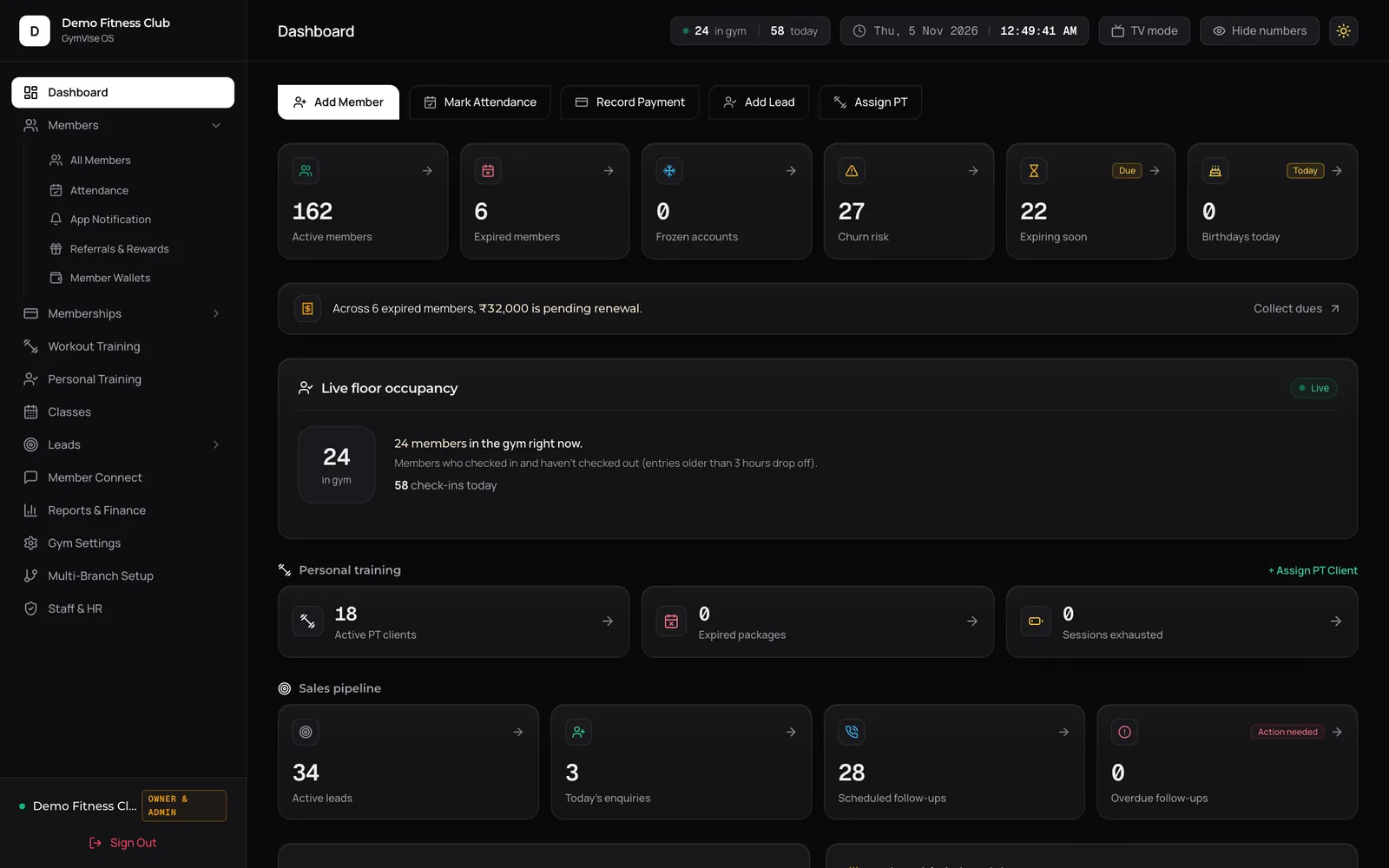
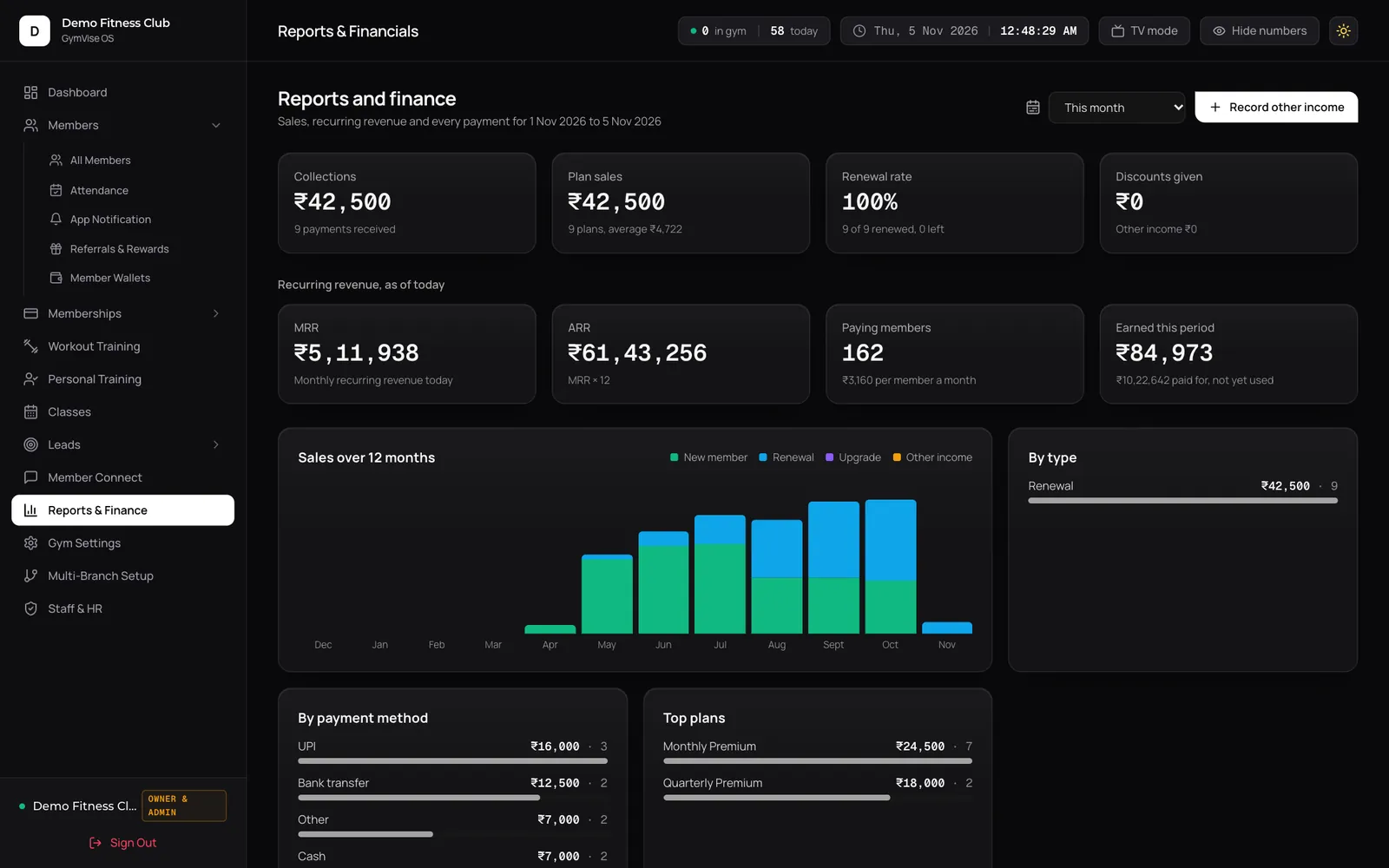
What owners see every morning
- Member health at a glance: active, expiring soon, expired and frozen members, birthdays today, and a churn risk count of members whose plan is due soon or expired in the last 14 days.
- Revenue and pending dues: what has been collected, what is outstanding, and a one-click path to collect dues.
- Expiring this week: a list of members about to lapse, with a one-tap button that opens WhatsApp with a pre-filled renewal reminder.
- Monthly targets: progress against your revenue, new-member and check-in targets.
- Sales pipeline: active leads, follow-ups scheduled today and overdue follow-ups.
- Personal training: active PT clients, expired packages and clients who have used all their sessions.
- Inactivity alerts: members with no visit or workout in 10 or more days.
- Quick actions: add a member, add a lead, record a payment, mark attendance or assign PT in one click.
Gym CRM: leads to members
Every walk-in and phone enquiry goes into the leads pipeline with a follow-up date. The dashboard shows what is due today and what is overdue, so no enquiry is forgotten. Members who refer friends can be rewarded through referrals.
Payments and reports
- Payment ledger: every receipt with member, plan, amount, status and payment mode: cash, counter UPI, card POS, bank transfer (NEFT/IMPS), cheque or Razorpay online payments.
- Record offline receipts as they happen at the desk, and export the full ledger to CSV for your accountant.
- Membership report: which plans sell most, new versus renewal business, average ticket size and where renewals are being lost, exportable by the owner.
GymVise records payments and exports them; it does not file GST returns. Your accountant can work from the CSV export.
Staff, roles and announcements
- Staff accounts with role levels for owners and admins, managers and trainers, each with their own login.
- Announcements: send a push notification to all active members and staff, or to your whole community including expired members, using templates such as holiday schedule, maintenance notice or new equipment.
Multi-branch management
Owners with more than one location manage every branch from one GymVise account, with a consolidated view across branches, while members only ever see their own gym.
Built to save admin time
- Bulk member import from CSV with progress tracking
- Automatic renewal reminders by push and in-app notification
- QR attendance that fills in visit history automatically
- Works in a browser on any laptop, with nothing to install
A Monday routine that takes 10 minutes
- Check churn risk and the expiring-this-week list; send renewal reminders.
- Open inactivity alerts and ask trainers to call members who haven't visited in 10 days.
- Clear overdue lead follow-ups.
- Glance at monthly targets and pending dues.
Related: plans and pricing · compare gym software · gym revenue & churn calculator
Frequently asked questions
Yes. Multi-branch management lets owners oversee several locations from one account, while members see only their own gym.
Yes. GymVise supports bulk member import from CSV, which you can export from Excel or Google Sheets.
Yes. The dashboard shows a churn-risk count (plans due soon or expired in the last 14 days) and flags members with no check-in or workout for 10 or more days.
Cash, counter UPI, card POS, NEFT/IMPS bank transfer, cheque and Razorpay online payments. The full ledger exports to CSV.
The expiring-members list has a one-tap button that opens WhatsApp with a pre-filled reminder, sent from your own phone. Automatic WhatsApp reminders are coming soon; today, automatic reminders go by push and in-app notification.
Yes. Staff accounts have role levels for owners and admins, managers and trainers.